Equations, Generate, and source intentions
Insert structured content and transform math without losing its body.
On this page
Generate a construct#
Press Generate (Cmd+N on macOS) in a LaTeX editor. The LaTeX formatting actions include prose wrappers, section levels, lists, links, references, labels, file inclusion, figures, tables, and equations. With text selected, actions preserve the selected content where appropriate and create one undoable edit.
For example, applying bold to important creates \textbf{important}. An equation action can wrap the selected math body instead of requiring you to type both delimiters.
Work on an equation#
Start with:
\begin{equation}\label{eq:energy}
E = mc^2
\end{equation}
Open LaTeX: Equation or TikZ Preview… from Find Action. Inspect the selected body and mode, use the symbol catalog if needed, and apply only when the preview matches your intent. Cancel or failed rendering should leave the original source intact.
Settings offer KaTeX, KaTeX with a LaTeX fallback, or compiler rendering. KaTeX gives immediate local feedback for supported math; compiler fallback needs a configured TeX toolchain. A local equation preview does not prove that every surrounding package/style in the full document is reproduced.
Use math intentions#
Supported intentions convert between inline/display math, equation, and align forms while preserving the body. Starred forms suppress numbering where supported. Add \left/\right to supported enclosing delimiters when scalable sizing is appropriate, then inspect the PDF for excessive visual spacing.
Generated source does not silently add packages. For align, use the missing-package fix to add amsmath if needed, then compile.
Keep labels in the correct place#
For a figure or table, a generated label belongs after the caption so it captures the float’s counter. For sections/equations, inspect the generated prefix and slug. Renaming a label through the IDE keeps supported references connected; manually changing only the printed caption does not rename its label.
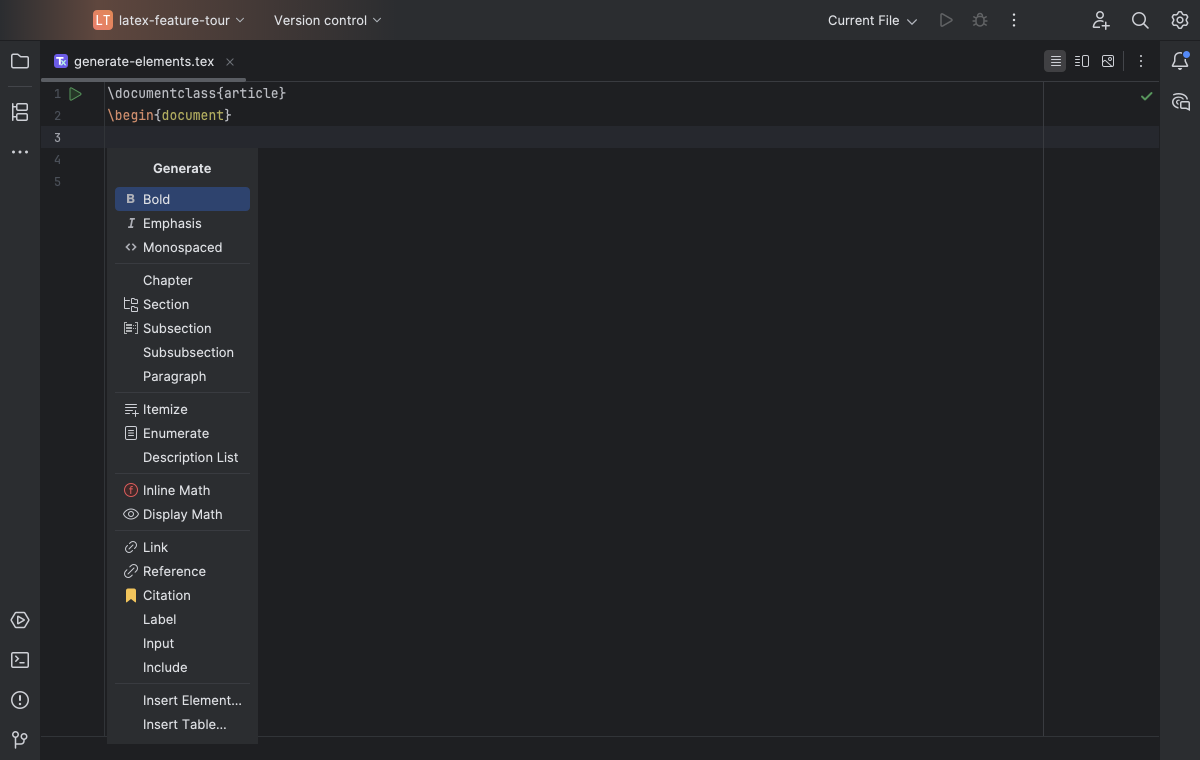
The Generate menu exposes structured LaTeX formatting and document elements. Select the image to view it at full size.
Manual for version 2026.1.14 · Reviewed